Use the group policy settings changes described below to rollback the changes to ‘Vulnerable’ state to allow RDP access.
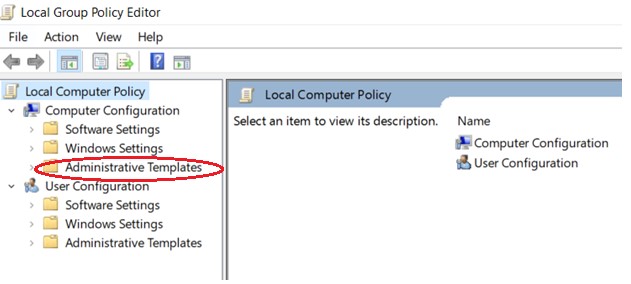
1. Open Group Policy Editor, by executing gpedit.msc
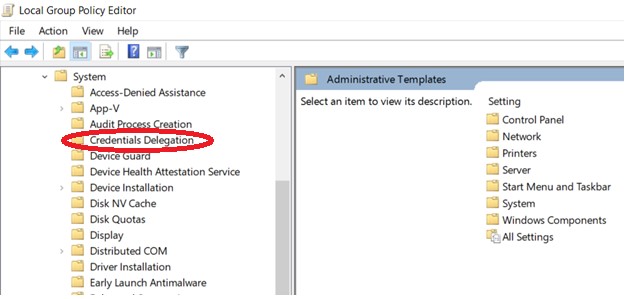
2. Policy path: Computer Configuration -> Administrative Templates -> System -> Credentials Delegation
Run gpedit.msc and expand Administrative Templates
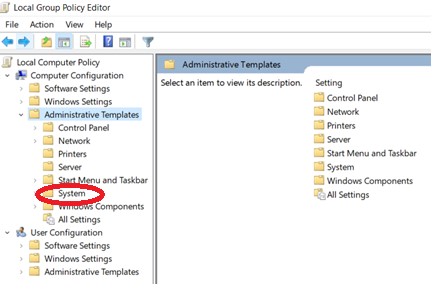
Expand Credential Delegation
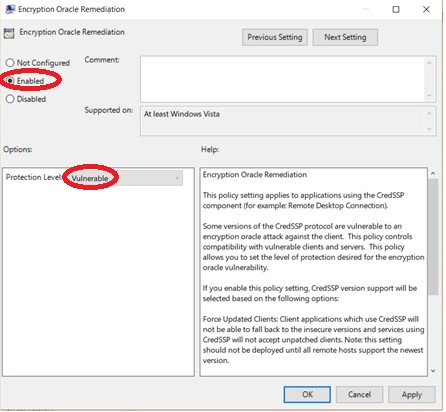
Edit Encryption Oracle Remediation

Select Enabled and change Production Level to Vulnerable
Run the command gpupdate /force to apply group policy settings.
Your remote desktop connection will be working fine now.
Thank you hope it will work well

 Techsolutions