①Uninstall KB971033 Update
Perhaps your Windows was running without any trouble until Windows 7 KB971033 update was installed. This update includes Windows Activation Technologies that help detect your Windows operating system.
Once it finds out the copy of Windows is not genuine, you may receive a message on the lower right part of the desktop stating “Windows 7 build 7601 this copy of Windows is not genuine”.
Hence, you can choose to uninstall this update to remove Windows 7 genuine notification build 7601/7600.
Uninstall Windows 7 KB971033 update
Since the computer has now been backed up, you can uninstall the Windows update to fix “this copy of Windows is not genuine build 7600/7601”.
- Click the Start button, and open Control Panel window.
- Choose the System and Security section.
- Go to Windows Update part, and click View installed updates option. Or click on View update history and hit the Installed Updates link at the top.
- Find the update of KB971033 and right-click on it to choose Uninstall button.
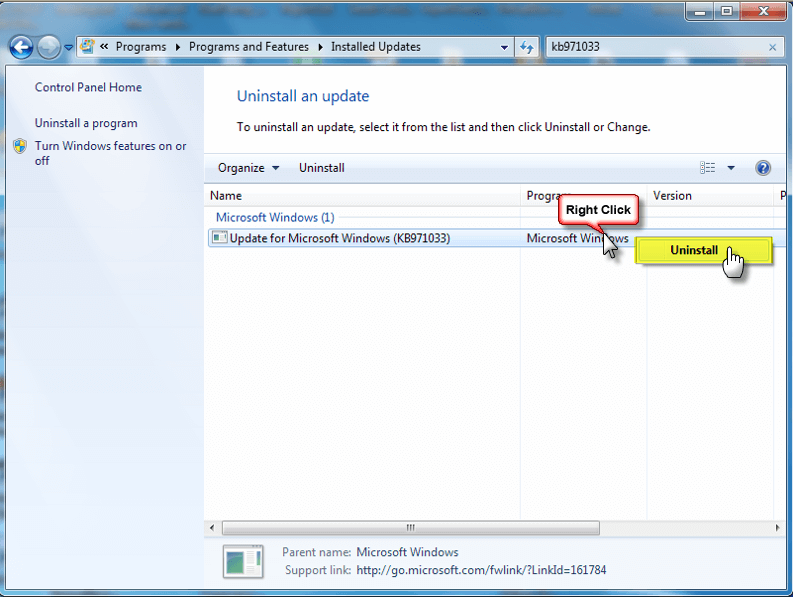
After completing the update, Windows 7 not genuine issue should be solved. If the message still exists, try the following method.
②Using SLMGR -REARM Command
In Windows, there is a built-in Windows 7 not genuine removal tool you can use to make Windows 7 genuine.
SLMGR, short for Windows Server License Manager Script, is the command prompt version of Microsoft licensing tool. And REARM command will help reset the licensing status of your machine.
Now, you can use SLMGR -REARM command to remove “this copy of Windows is not genuine 7601/7600 issue”.
- Go to Start menu and search for Command Prompt. Right-click on cmd.exe in the search result and choose Run as Administrator.
- Type SLMGR -REARM command in the pop-up window, and press Enter.
- A pop-out window shows that your command has completed successfully and requires you to restart the system. Click OK to let all changes take effect.
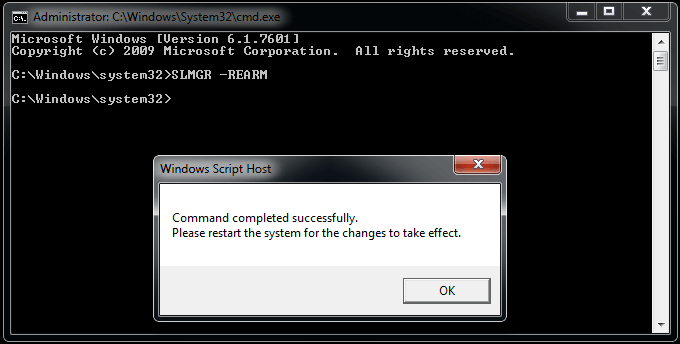
You can choose to reactivate it every 30 days for 3 times. That is, you essentially get 120 days for this version of Windows.
To break the limit, here is what you can do:
- Open the Run window by hitting Win + R keys, input regedit.exe in the text box and press Enter to open Registry Editor
- Navigate to HKEY_LOCAL_MACHINE > Software > Microsoft > WindowsNT > Current version > SoftwareProtectionPlatform.
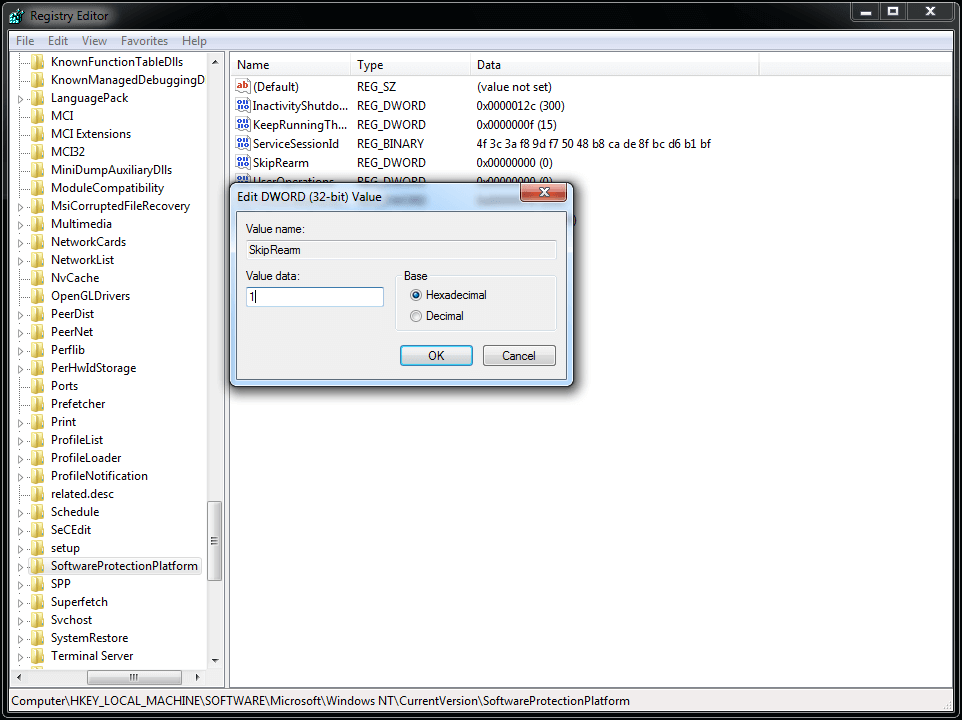
- Find SkipRearm and right-click it to choose Modify.
- Change the value from 0 to 1.
- Restart your computer.
You can now use the slmgr -rearm command for another 8 times, which is another 240 days. In total, you will get free Windows 7 for 120 + 240 = 360 days.
slmgr is not recognized as an internal or external command – How to fix
If you want to convert not genuine windows to genuine, you need to read This copy of windows is not genuine: easy solution.
While using command “SLMGR -REARM” mentioned in above article, you may get error “slmgr is not recognized as an internal or external command“. Or any other error same as above error message.
There are lot’s of reasons for this error. This article may cover all the reasons and their solutions. Exclusive Gift: Want to read this article offline? Click Here to Download Our Free EBook Which gives you Simple fix for Windows (7 & XP) Not genuine Errors.
1. Reason : There might be spelling mistake.
Solution : Make sure there is a space between “SLMGR” and “-REARM”.
2. Reason : You might not opened Command Prompt as Administrator.
Solution : Right click on “CMD” and select “Run as Administrator”.
3. Just try “SLMGR /REARM” instead “SLMGR -REARM”.
4. Open Command Prompt as Administrator.
type cd \ and press enter.
type cd windows\system32 and press enter.
Now you will see C:\windows\system32>. Now use command like this C:\windows\system32>SLMGR -REARM
5. Reason: slmgr.vbs file might have any other extension. You need to remove the extension by renaming the file.
Solution: Go to My computer
Go to “C” drive.
Select folder “Windows”.
Select folder “System32”.
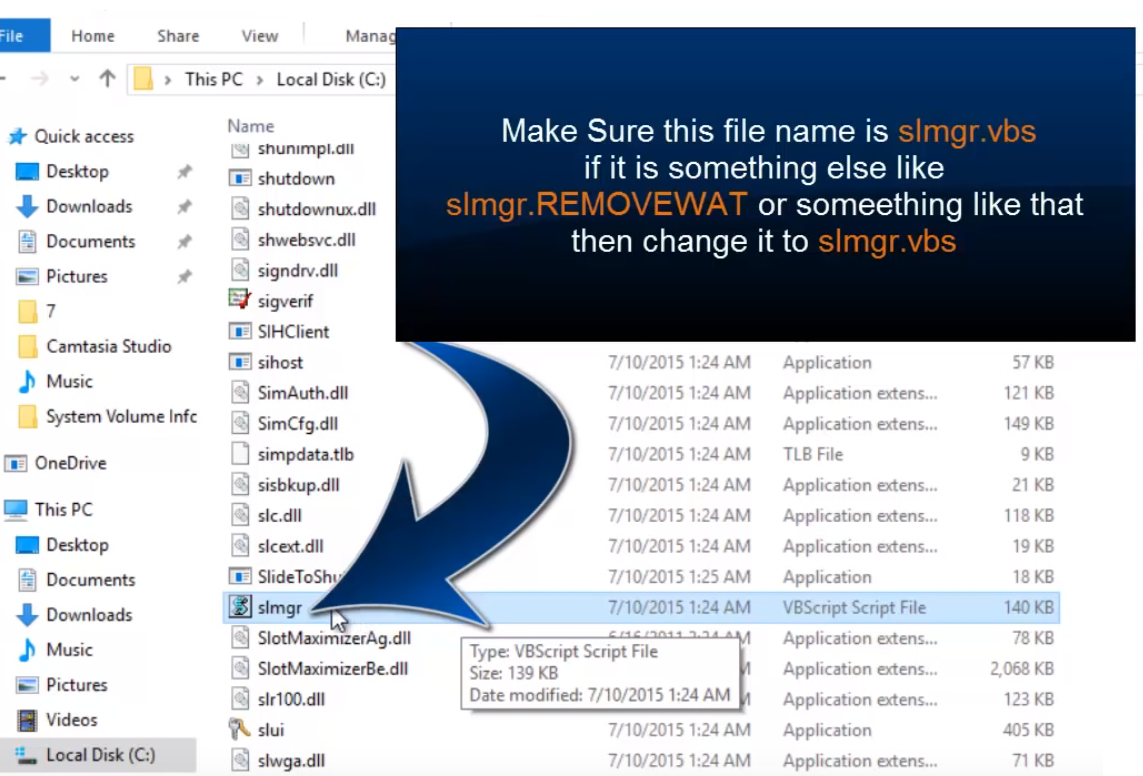
Scroll down until “slmgr.vbs.REMOVEWAT”. Right-click on it and rename it to “slmgr.vbs”. If you don’t find “REMOVEWAT” extension, remove any other extension at the end of slmgr.vbs.
Then Again Run The Command And Restart The System And Run the Windows Activator. Finally you get better result.
Final Word
When you follow above methods properly, you will not see any error in the future. You can use your OS forever but without updates.
Remember, Always hackers attack older versions of OS and software on your computer to place malware and to hack your details. I always recommend you to use the latest versions of OS and any software.

……………………………………………….Thank you……………………………………..

 Techsolutions